Mayfly Font: Spring Floral Typography for Your Designs
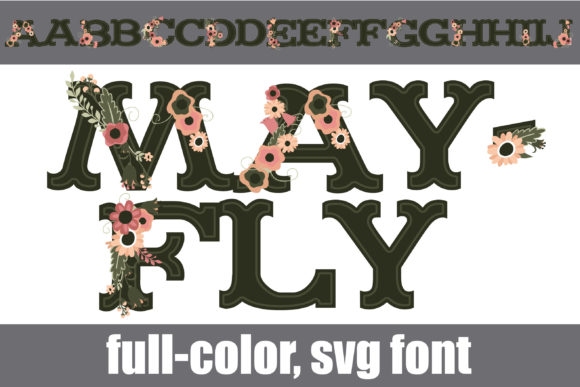
Finding a typeface that captures the essence of a season without looking generic is a challenge many creatives face. Mayfly steps into that gap as a full-color font that does more than just convey words; it brings a specific aesthetic immediately to your canvas. Featuring dark green lettering interwoven with pretty flowers, this font is designed to inject life into spring-themed projects. It is not just a set of characters; it is a design asset that combines modern typography with the organic beauty of nature.
A Creative Font with Built-In Visual Style
What makes Mayfly distinct in the crowded marketplace of premium fonts is its construction. As an OpenType-SVG color font, it renders in full color directly within your design software. You do not need to layer effects or manually add floral elements to the letterforms; the botanical details are already integrated into the typeface itself. The "ink" is a rich, dark green, providing a grounding contrast to the delicate flowers that decorate the strokes.
This specific style positions Mayfly as a specialized display font. It is not intended for body text in long-form articles or dense legal documents. Instead, it functions as a focal point. The personality of the font is inherently cheerful, organic, and inviting. It carries the visual weight of a graphic element while maintaining the functionality of text. For designers working on tight deadlines, this is a significant advantage. It allows you to achieve a complex, layered look with a simple text tool, streamlining the creation process for social media graphics or web design headers.
Strategic Applications for Brand Identity and Marketing
When considering where Mayfly fits best, look at projects that require an emotional connection to nature, freshness, or celebration. Brand identity is a prime area of application. For a small business owner launching a spring collection—perhaps a florist, a boutique soap maker, or a garden center—this font can become a cornerstone of their visual branding. It immediately signals "seasonal" and "handcrafted" without sacrificing professionalism.
In the realm of packaging design, the font shines. Imagine a label for a lavender tea or a botanical gin. Using Mayfly for the product name creates an instant shelf appeal. The floral elements suggest natural ingredients, while the structured lettering ensures the brand name remains legible. This balance is crucial in editorial design as well. A magazine cover featuring a spring fashion spread or a wellness feature can use this typeface to set the mood instantly. It acts as both a headline and an illustration, saving valuable layout space and adding visual interest.
Entrepreneurs and content creators can also leverage Mayfly for digital assets. In web design, a hero image featuring this font can set a seasonal tone for a homepage banner. For bloggers, it serves as a unique header font that differentiates their content from standard, generic templates. It is particularly effective for wedding invitations, greeting cards, and event stationery where the aesthetic needs to be romantic and polished.
Understanding Technical Compatibility and Usability
While the visual appeal of Mayfly is strong, practical application requires understanding its technical specifications. This is a color font, which means it relies on specific rendering capabilities. It is fully compatible with professional design software including Adobe Photoshop, Adobe Illustrator, Silhouette, and Inkscape. This covers the majority of professional workflows for graphic designers and print shops.
However, it is important to note the limitations regarding cutting machines. The OTF and TTF files for Mayfly are not compatible with Cricut machines. If your workflow involves cutting vinyl or paper using Cricut software, this particular font will not render the color data or the floral details correctly. It is designed for digital printing and raster/vector creation, not for physical cutting paths. Always verify your toolset before purchasing to ensure the asset fits your specific production method.
One of the standout features of Mayfly is its PUA (Private Use Areas) encoding. In practical terms, this means that every glyph, swash, and ligature is accessible even if you do not have advanced OpenType features in your software. You can access the full range of characters through a character map or a glyph panel, making it user-friendly for hobbyists using simpler design platforms as well as professionals using advanced suites.
Practical Tips for Using a Floral Display Typeface
Integrating a highly stylized font like Mayfly into a cohesive design requires a strategic approach to typography. Because this font is visually dense with its floral motifs and color, it demands a counterpart that offers contrast and clarity.
Here are a few practical recommendations for using this typeface effectively:
- Font Pairing is Essential: Do not pair Mayfly with another decorative script font or a complex serif font. It will create visual noise. Instead, pair it with a clean, modern sans serif font. A geometric sans serif will complement the organic curves of the flowers without competing for attention. This creates a clear visual hierarchy where Mayfly is the star, and the supporting text provides the necessary information.
- Focus on Hierarchy: Use this font exclusively for headlines, sub-headers, or call-to-action buttons. Its role is to grab attention. If you use it for a long sentence, the reader’s eye may fatigue. Limit its use to short bursts of text—three to five words is often the sweet spot.
- Consider the Background: Because the font features dark green lettering, it will stand out best against light, neutral backgrounds. White, cream, or very pale pastel shades allow the botanical details to pop. Avoid placing it over busy photography or dark colors where the definition of the flowers might be lost.
- Size Matters: As a display font, Mayfly is best viewed at larger sizes. When scaled down too small, the intricate details of the flowers may blend together and become muddy, reducing readability. Let it breathe on the page.
Evaluating Fit for Your Project
Before committing to Mayfly for a commercial project, consider the longevity of the design. While it is perfect for seasonal marketing campaigns, spring promotions, and event-specific branding, it may not be the best choice for a year-round corporate identity unless your business is strictly seasonal. Its strong association with spring and nature makes it a specialized tool rather than a workhorse font.
For those in the crafting and hobbyist space, this font offers a way to create professional-looking designs without needing advanced graphic design skills. The fact that the color and floral elements are "baked in" means you don't have to worry about layering different colors or aligning intricate SVG elements manually. You simply type, and the design appears.
Ultimately, Mayfly