Leopard Light Brown: A Friendly, Chic Font for Your Projects
When you're working on a design that needs to feel approachable, stylish, and a little bit playful, the right typeface does more than just convey words. It sets the entire mood. This is where a font like Leopard Light Brown enters the conversation. It's not just a set of letters; it's a specific voice—a chic, cute, and friendly one that's particularly well-suited for projects aimed at a feminine audience. Think of it as a design asset that brings a certain warmth and personality to the table.
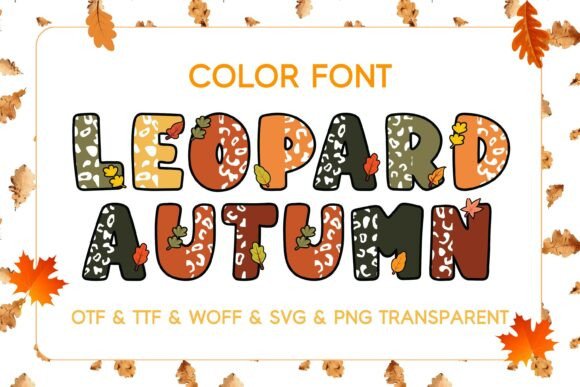
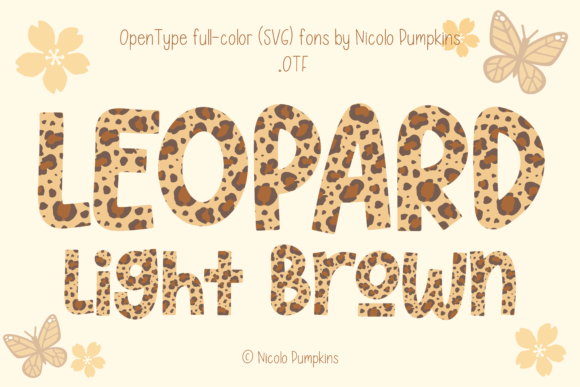
Visually, Leopard Light Brown is a display font, meaning it's crafted for impact and headlines rather than long paragraphs of body text. Its character comes from a soft, approachable structure. The light brown color is integral to its identity as a color font (specifically an OpenType-SVG format), giving it a unique, textured appearance right out of the box. This isn't a standard black letterform you color later; the warm, animal-print-inspired hue is baked in, offering immediate visual interest. The style sits at an interesting crossroads—it has the neatness of a sans serif font but with enough rounded edges and friendly curves to feel almost like a handwritten font or a modern script font in spirit. It’s this blend that gives it that "chic and cute" personality.
Where This Typeface Truly Shines
Understanding a font's personality is one thing, but knowing where to deploy it is what matters for a content creator or small business owner. Leopard Light Brown excels in applications where you want to create an emotional connection and a memorable impression without being overly formal.
- Apparel & Accessories: This is a natural fit. Imagine this font on a t-shirt with a witty quote, on the side of a tote bag, or embroidered on a hat. The friendly vibe is perfect for casual wear, boutique brands, or merchandise for a lifestyle blog.
- Branding & Identity: For businesses that want to project a welcoming and approachable brand identity—think a bakery, a boutique florist, a women's wellness coach, or a handmade jewelry line—Leopard Light Brown can be a fantastic choice for a wordmark logo or brand name. It says, "We're friendly and we have style."
- Marketing Materials: Use it for social media graphics, Instagram story templates, or Facebook ads. Its distinct look helps posts stand out in a crowded feed. It's also great for packaging design on labels or stickers for products like candles, cosmetics, or gourmet treats.
- Stationery & Events: The font is ideal for wedding invitations, save-the-date cards, greeting cards, and event posters. Its cute and friendly character helps set a joyful, celebratory tone for personal milestones.
- Digital & Editorial: While not for body text, it works beautifully for pull quotes, chapter titles in a digital magazine, or as a stylized heading in a web design banner for a specific campaign.
Making It Work in Your Design Toolbox
Bringing a premium font like this into your workflow is about more than just liking how it looks. It's about strategic implementation. Here’s some practical guidance from a design perspective.
Evaluating Fit and Font Pairings
First, ask: does the personality of Leopard Light Brown align with my project's message? If you're designing for a law firm or a financial institution, it's probably not the right choice. But for a yoga studio, a children's boutique, or a craft blog, it could be perfect. Once you've decided it fits, the next step is font pairing. Because it's a strong display font, it needs a quieter partner. Pair it with a clean, neutral sans serif font for body text or secondary information. A simple geometric sans serif can provide excellent contrast, letting Leopard Light Brown be the star for headlines while maintaining overall readability and visual hierarchy.
Understanding the Technical Details
This is crucial for a smooth workflow. Leopard Light Brown is a color font in OpenType-SVG format. This means the color and texture are part of the font file itself. Compatibility is key. It works seamlessly in recent versions of Adobe Photoshop, Adobe Illustrator, Silhouette Studio, and Inkscape. However, it is not compatible with Cricut Design Space. The OTF/TTF files that are sometimes included with such products are typically standard vector outlines and won't have the color information. Always check the product listing and our Ultimate Font Guide for specifics on software support before purchasing for your cutting machine projects.
Testing and Licensing
Before you finalize a design, always test the font in your actual project environment. Check how it renders at different sizes. Is the "light brown" color legible against your chosen background? Does the detail hold up when scaled down for a business card versus a large poster? Finally, review the licensing. Most fonts like this come with a commercial license that allows you to use them in projects for sale, but there may be restrictions on things like embedding in apps or large-scale digital distribution. Understanding the license protects you and ensures you're using the design assets correctly.
In the end, a typeface is a tool. Leopard Light Brown is a specific tool designed for a specific job: to add a layer of friendly, chic personality to your creative work. Used thoughtfully, it can help your designs connect with an audience on a more personal level, making your brand or project feel more approachable and engaging. It’s about finding the right voice for the message you want to send.