Alligator: The Creative Font with a Wild, Textured Style
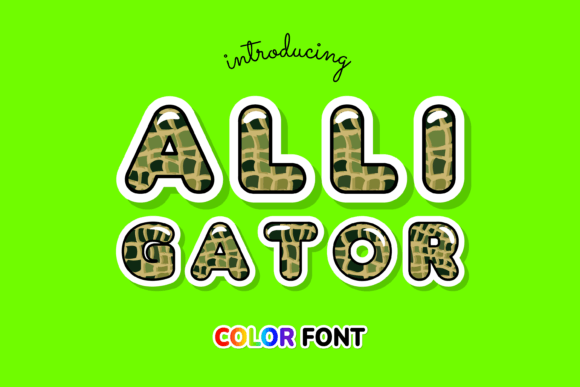
If you’ve been searching for a premium font that breaks away from the standard flat vector look, you’ve likely noticed that modern design is shifting toward depth and realism. We are seeing less of the sterile, corporate sans-serifs and more personality-driven typography. Enter Alligator, a typeface that doesn’t just sit on the page—it practically crawls off it. This is not your average installation; it is an incredibly cool color font designed with a distinct alligator skin pattern.
For designers, entrepreneurs, and creatives who need to make an immediate visual impact, this creative font offers a solution that standard typography cannot match. Because it utilizes Opentype-SVG technology, the texture and color are baked directly into the font file. This means you get that scaly, reptilian aesthetic instantly, without needing to manually apply clipping masks or texture overlays in Photoshop or Illustrator.
Visual Characteristics and The "Wild" Aesthetic
Let’s talk about what makes Alligator visually distinct. Most display fonts rely on clean lines or sharp edges. Alligator, however, embraces the organic chaos of nature. The letterforms feature a high-contrast structure that mimics the rugged surface of reptile skin. It strikes a balance between legibility and artistic flair; while the surface is textured, the underlying letter shapes are bold enough to remain readable at larger scales.
The personality of this typeface is unapologetically bold. It conveys a sense of the exotic, the adventurous, and the untamed. It avoids the stiffness of a traditional serif font and the neutrality of a sans serif font. Instead, it occupies a unique space in modern typography where texture is the primary feature. This makes it an excellent choice for projects that need to convey strength, durability, or a touch of the wild.
Strategic Applications: Where to Use Alligator
Choosing the right font is about context. You wouldn’t use a delicate script font for a construction company, and you wouldn’t use a blocky slab serif for a wedding invitation. Alligator fits best in scenarios where high impact is required. Here is where this display font truly shines:
- Logo Design and Brand Identity: If you are building a brand that needs to be remembered, Alligator provides instant distinctiveness. It works exceptionally well for sports teams, outdoor adventure brands, streetwear labels, or music festivals. It helps build a brand identity that feels raw and authentic.
- Packaging Design: In a crowded marketplace, packaging needs to grab attention in milliseconds. Using Alligator for product names on labels—especially for jerky, hot sauces, craft beers, or rugged outdoor gear—adds a tactile quality to the visual experience.
- Social Media Graphics: The scroll-stopping power of this font is significant. For Instagram posts, YouTube thumbnails, or TikTok overlays, the texture adds a layer of professionalism and depth that flat text cannot achieve. It helps content creators stand out in a busy feed.
- Merchandise and Apparel: This is perhaps its strongest suit. Because the font already looks like a texture you might find on a high-end jacket or sneaker, it translates beautifully to T-shirts, hats, and tote bags. It acts as a graphic element on its own.
Technical Reality: Compatibility and Workflow
Here is the part where we need to get practical. As an experienced designer, I know that the most beautiful font in the world is useless if it doesn’t work with your software. It is vital to understand that Alligator is a color font (specifically Opentype-SVG). This is a newer technology that allows for vector shapes to contain color fills and gradients.
Compatibility Check:
- Works Great With: Adobe Photoshop, Adobe Illustrator, and Inkscape. These programs fully support the rendering of the SVG data, meaning you will see the alligator pattern perfectly.
- Hardware Cutters: If you use a Silhouette machine, you are in luck, as it supports these files.
- Important Note on Cricut: If you are a crafter relying on a Cricut machine, please note that the standard OTF/TTF files of this product are not compatible. Cricut Design Space has limitations with color SVG fonts. You would need to use this font in a program like Illustrator first, export the text as a flat image (PNG or SVG), and then upload that to Cricut.
Because this is a premium font, it behaves differently than the fonts pre-installed on your computer. It requires software that can interpret complex vector data. For a deep dive into installation and usage, checking out a comprehensive guide on modern typography and color fonts is highly recommended to ensure a smooth workflow.
Pairing and Hierarchy: Keeping the Balance
One of the biggest mistakes I see in web design and editorial design is using two competing display fonts. Alligator is a "loud" font. It has a strong voice. Therefore, you need a partner that knows when to be quiet.
When establishing your visual hierarchy, reserve Alligator exclusively for headlines, sub-headers, or single-word callouts. Do not use it for body text; the texture will become noisy and unreadable at small sizes, reducing your readability.
Recommended Pairings:
- With a Clean Sans Serif: Pair Alligator with a geometric sans serif like Montserrat or Futura. The clean, mathematically precise lines of the sans serif will contrast beautifully with the organic, scaly texture of Alligator. This creates a modern, high-fashion look.
- With a Monospaced Font: For a more edgy, industrial vibe, pair it with a monospaced typeface. This works well for music posters or tech-adjacent branding.
- Color Coordination: Since the font comes with a pre-baked color (usually greens or greys to mimic skin), ensure your background color doesn't clash. Stick to neutrals—black, white, charcoal, or beige—to let the font's texture breathe.
Commercial Licensing and Project Fit
Before you download, always evaluate the fit of the design assets for your specific project. Ask yourself: Does the "skin" texture support the message? If you are designing a flyer for a daycare, probably not. If you are designing a logo for a reptile house or a heavy metal band, absolutely.
Regarding licensing: Because this is a commercial font, you are paying for the legal right to use it in revenue-generating projects. This covers your logo design, your packaging design, and your client work. Always double-check the specific license (Standard vs. Extended) if you plan to use it on high-volume merchandise (e.g., over 500 sales), though for most small business owners and bloggers, the standard license covers the vast majority of use cases.
In summary, Alligator is a specialized tool in your design assets kit. It isn't for every job, but when you need to inject some texture, personality, and a "wild" aesthetic into your brand identity or creative project, it delivers a look that standard handwritten fonts or serifs simply can't replicate. Just remember to check your software compatibility, use it for impact rather than long-form reading, and pair it with something simple to let the scales do the talking.